Homeschool records check-in
See what you have saved while the year is still fresh.
Records at a Glance brings attendance, courses, reading, activities, and other useful records into one calm check-in. Add what helps your family and leave the rest alone.
14 days free. No credit card. No automatic charge.
Then $9.99/month or $79/year for your whole family. See family pricing.
Laura · 2026–2027
Records at a Glance
14 days free. No credit card. No automatic charge.
Then $9.99/month or $79/year for your whole family. See family pricing.
A little at a time
Know what is already there without making another to-do list.
Records at a Glance gathers practical checks from across the workspace and shows what is saved, what is in progress, and what you might add when it is useful. Each item explains what Commonplace found and links to the right place when you want to add more.
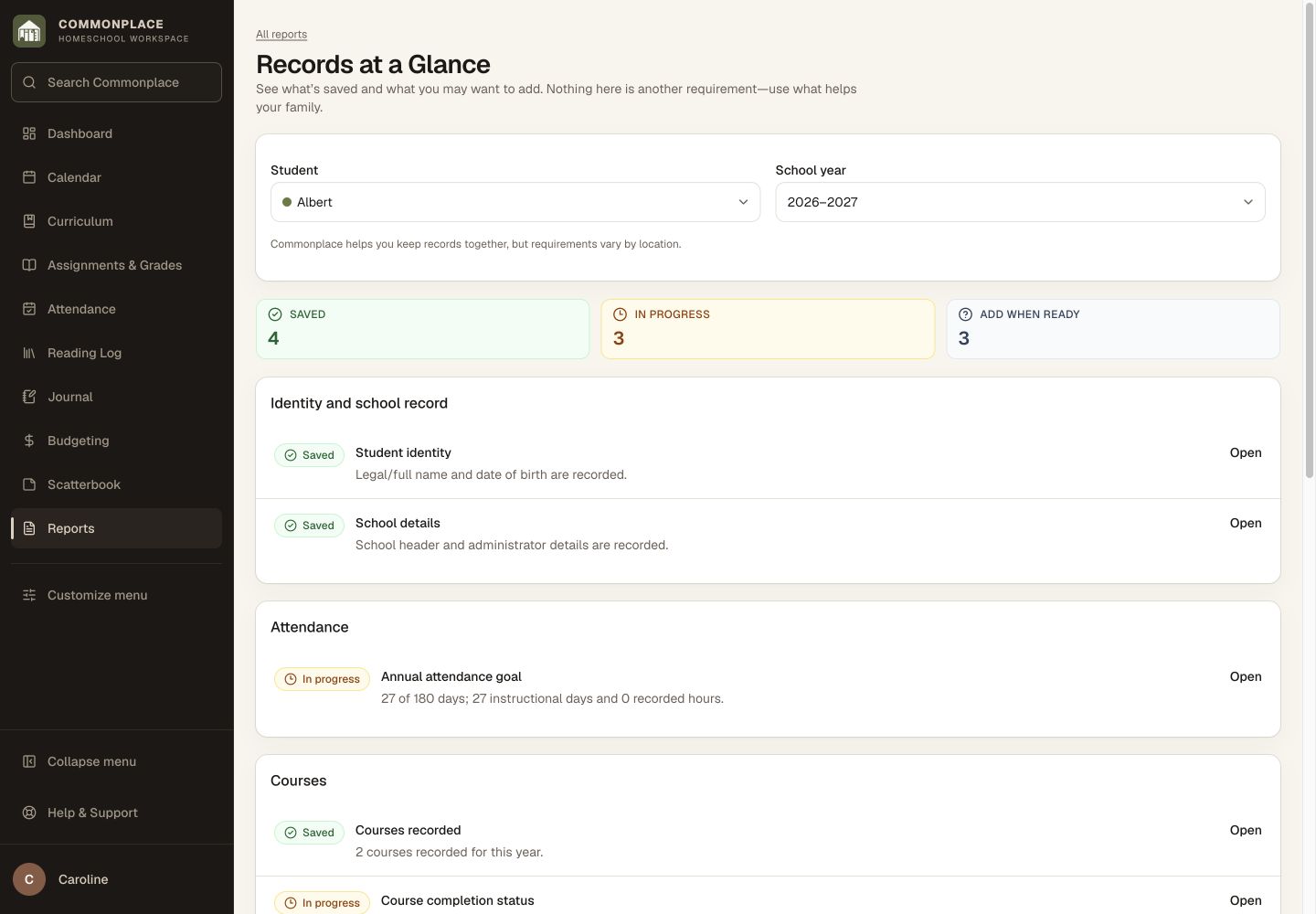
Fictional family data shown. This is a recordkeeping aid, not a determination of legal compliance.
The useful pieces of the year
See what you’ve already saved, all in one place.
Attendance
See the instructional days and hours recorded for the selected student and year.
Courses and grades
Notice a course detail or result you may want to add while it is easy to recall.
Curriculum
Review the resources and course-of-study details that describe what the student learned.
Reading and activities
See the books, activities, field trips, and notes that are telling the story of the year.
Formal records
Know whether progress reports, portfolios, or transcript details are useful for this student and year.
The right next place
Open the related area only when you decide a missing detail is worth adding.
A gentle way to check in
Keep the end of the year from becoming a memory test.
A quick check now can save a much bigger search later, without making every little detail another task for you.
Select student and year
Choose whose records you want to glance over.
See what is there
Scan what is saved, what is taking shape, and what can wait until you are ready.
Add only what helps
Follow a link when a detail matters to your family, evaluator, umbrella school, or local requirements.
Common questions
Homeschool record check-ins, in plain language.
What does Records at a Glance show?
It checks practical recordkeeping areas such as attendance, courses, grades, reading, activities, and formal student documents.
Does “add when ready” mean something is required?
No. It means Commonplace found a detail you may want later. Whether it matters depends on your family and local requirements.
Are all suggested documents required?
No. Some records are optional or useful only for particular families, students, ages, or reporting situations.
Can I go directly to the related record?
Yes. When a related workspace screen is available, the item links to the place where you can review or add it.
Is this the same as Year in Review?
No. Records at a Glance is a practical check-in. Year in Review is a family keepsake made from books, outings, photos, notes, and finished work.
Should I still check my local requirements?
Yes. Commonplace supports general recordkeeping, but you remain responsible for understanding the rules that apply to your homeschool.
Keep the little things close as the year unfolds.
See what is already there, add the details that will help later, and leave optional pieces optional.
Start your free 14-day trial14 days free. No credit card. No automatic charge.
Then $9.99/month or $79/year for your whole family. See family pricing.