Homeschool portfolio
Collect the work. Keep the story.
Turn selected work, reading, activities, photos, and notes into a portfolio of one child’s year. Save meaningful things as you go, or start with the photos, books, and work you already have.
14 days free. No credit card. No automatic charge.
Then $9.99/month or $79/year for your whole family. See family pricing.
You choose what to save and can export it anytime. We don’t use your children’s homeschool information for advertising. Read our privacy policy.
A year of learning
Laura Ingalls
2026–2027
Selected work, reading, activities, and reflections
See the result
From a leaf study to a page worth keeping.
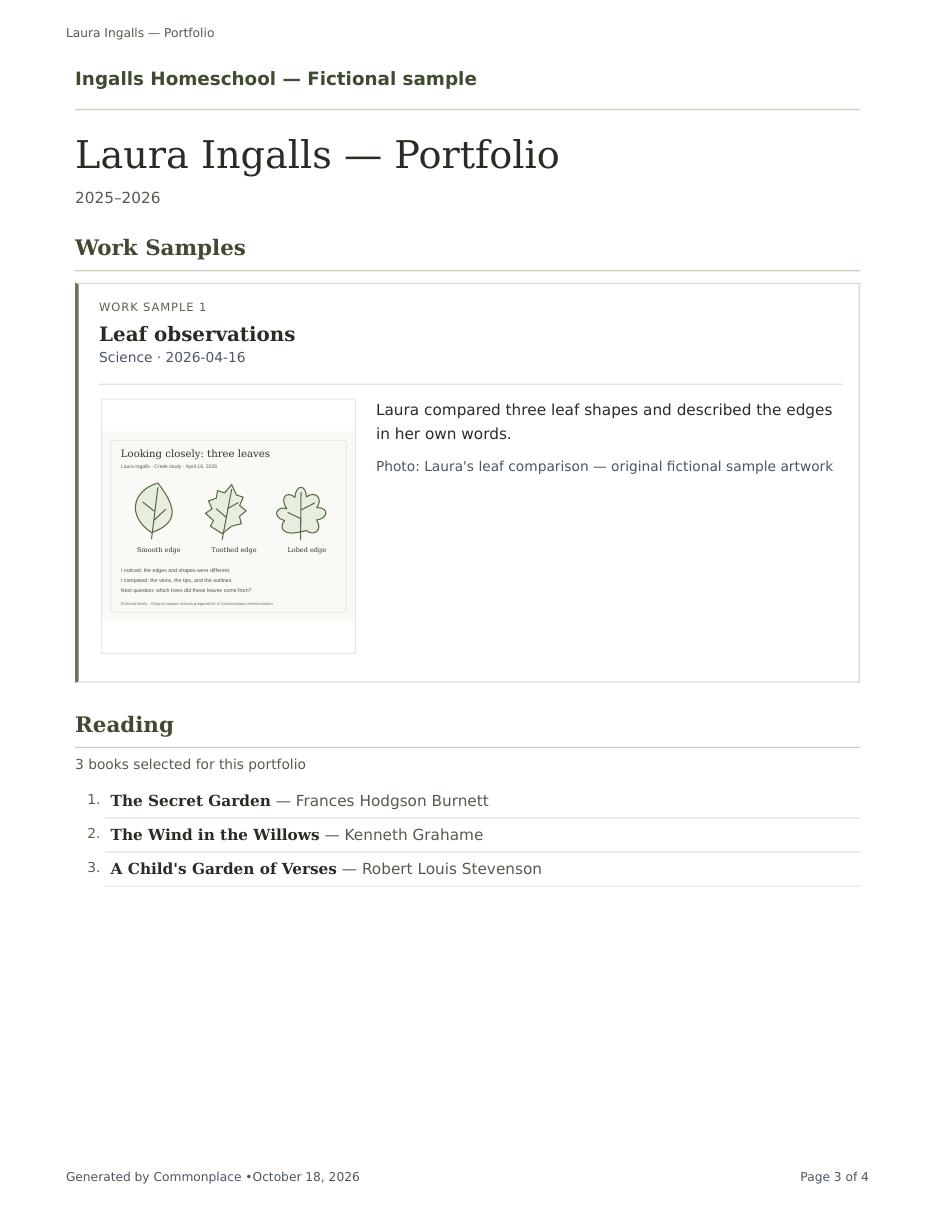
Laura saves a nature-study drawing and a short note, then marks it for her portfolio.
The finished portfolio is a PDF you can download, print, or send to an evaluator. They do not need a Commonplace account to open it.
- Select meaningful work, books, and activities as you go.
- Add your own cover and introduction.
- Open the sample to see the finished work page as well as the cover.
Fictional Ingalls family data. Actual PDF generated by Commonplace.
Start with what you have
Starting late? Start with the work you have.
You can begin in May as well as September. Bring together the photos, work samples, books, and activities you’ve already kept, then choose what belongs in your child’s portfolio.
- Gather meaningful workUpload existing photos or files alongside assignments, activities, or journal entries.
- Add the contextAdd the books, dates, and details you can confirm from your lists, calendar, and children’s work.
- Review the portfolioSelect the evidence, add your introduction, and preview the PDF before saving.
14 days free. No credit card required.
Capture learning while it is still close
Keep the meaningful things while they’re still close.
Use the family journal to keep photos, notes, activities, and work close as learning happens. Mark the pieces worth carrying forward, then shape the final portfolio when you are ready.
Having trouble playing this? Open the video directly.
Make a portfolio, then keep a copy
For a closer look, use full screen. On a phone, turn it sideways for larger text.
Open the sample portfolio PDF ↗
Read the steps
- Choose the books and work you want to include.
- Keep a compact reading list, or choose to include book notes.
- Save a new portfolio to create a dated version.
- Preview the saved pages, then download the PDF.
- Selected work and books stay clearly separated.
- Activities have their own space, too.
See a learning moment become part of a portfolio. No sound needed.
The pieces that matter
Show more than a stack of finished worksheets.
A homeschool portfolio can hold academic evidence and the broader experiences that made the year distinctive.
Selected work
Include assignments and work samples intentionally marked for the student’s portfolio.
Reading
Selected books appear as a compact, numbered list of titles and authors. Book notes stay out unless you choose Include book notes when making the portfolio. Selected reading attachments have their own highlights section.
Activities
Preserve field trips, enrichment, projects, and learning that happened beyond coursework.
Photos and files
Keep photos and files beside the work and activities they help explain.
Annual testing
Record the test name and date. Result files stay out of the portfolio unless you mark an attachment as a portfolio work sample. Private testing notes are not included.
Your voice
Add a custom cover, subtitle, note, introduction, and your own photo or artwork.
A portfolio that grows naturally
Choose as you go. Assemble when you are ready.
The little things you save can become part of the portfolio. You choose which ones belong.
Capture the learning
Add assignments, books, activities, photos, journal notes, and supporting files throughout the school year.
Select what belongs
Mark meaningful examples for the portfolio instead of sorting the entire year from scratch later.
Finish a lasting version
Customize the opening pages, review the selected material, and save a dated finalized copy. Download the PDF to email, upload, print, or keep.
Made for a particular child and year
A portfolio with room for personality.
Choose the student and school year, then give the portfolio a cover and introduction that sound like your family. Each finalized version remains saved as its own dated document, so a later revision does not erase an earlier copy.
Cover page
Use your title, subtitle, note, colors, and optional family photo or student artwork.
Introduction
Add context about the year, the learner, and the educational approach behind the selected work.
Selected evidence
Bring together the work, books, activities, attachments, and testing record chosen for that year.
Finalized copy
Keep dated versions available for long-term records, evaluation, or your own family archive.
Common questions
Homeschool portfolios, in plain language.
Do I need to have used Commonplace all year?
No. Add the work samples, reading, and activities you already have for the school year, then select the items that belong in the portfolio. You can also import an existing reading list from Excel or CSV. Commonplace organizes what you provide; you still review the evidence and details.
Can I add photos from my phone?
Yes. Open Commonplace in your phone’s browser and add a photo from your device to a journal entry or activity. Add a short note while the details are fresh, then choose whether it belongs in the portfolio. You can use photos already in your camera roll; no need to move them to a computer first.
How do I send a portfolio to an evaluator?
Review and finalize the portfolio, then download the PDF. You can attach that file to an email, upload it wherever your evaluator requests, or print a copy. Your evaluator does not need a Commonplace account to read the PDF.
What can I include in a homeschool portfolio?
Commonplace can collect selected work, reading, activities, attachments, and annual testing information into a student’s portfolio for a particular school year.
Does everything I record appear automatically?
No. You choose what belongs. Select the work, books, and activities you want to include so the portfolio tells the story you want to share.
Can I customize the portfolio cover?
Yes. You can use a custom title, subtitle, note, color, introduction, and an optional uploaded photo or artwork.
Can I keep more than one version?
Yes. Finalizing never overwrites an old copy. Each finalized portfolio is saved as its own dated version.
Can I include standardized testing?
Yes. The test name and date can appear in the portfolio. Official result files are excluded unless you mark an attachment as a portfolio work sample; selected PDFs become supporting pages. Private testing notes stay out of the portfolio.
Will this guarantee my portfolio meets local requirements?
No. Portfolio and evaluation rules vary by location. Commonplace organizes your materials, but your family is responsible for confirming current local requirements.
A practical note: Check the current portfolio or evaluation rules for your own state, province, country, umbrella school, or reviewer.
A portfolio should feel like a year of learning—not a year of filing.
Start with one piece of work worth keeping, whether it happened today or earlier in the year. Bring those pieces together in a portfolio your family can share and keep.
Start building your portfolio free14 days free. No credit card. No automatic charge.
Then $9.99/month or $79/year for your whole family. See family pricing.