Homeschool transcript maker
Build the transcript from the work already done.
Bring course grades, credits, GPA, and descriptions from the high-school years you choose into one parent-issued transcript. Keep courses as you go, or add finished courses from earlier years.
14 days free. No credit card. No automatic charge.
Then $9.99/month or $79/year for your whole family. See family pricing.
You choose what to save and can export it anytime. We don’t use your children’s homeschool information for advertising. Read our privacy policy.
Academic transcript
Mary Ingalls
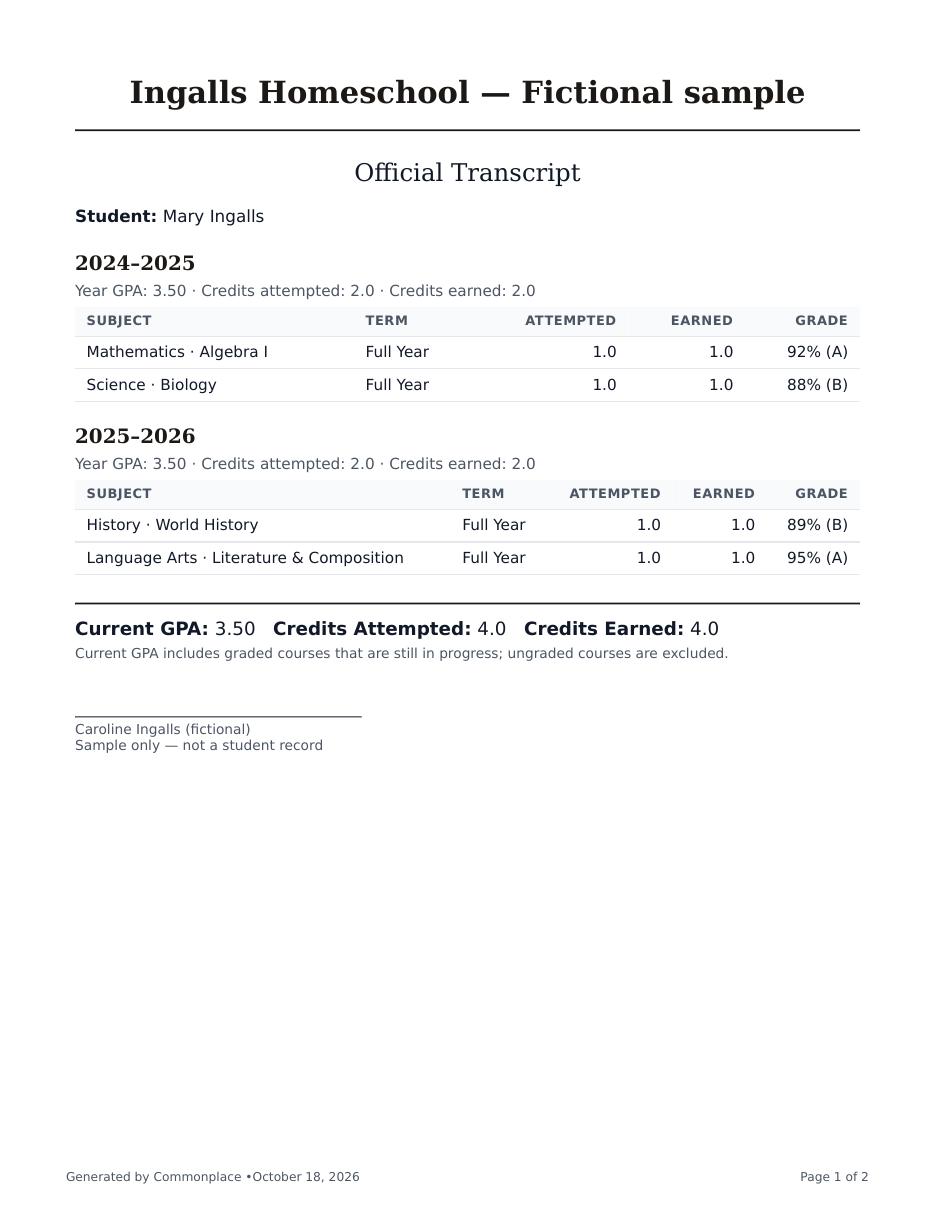
Illustration based on the sample below. Four completed courses, four earned credits.
See the result
See the whole transcript before you start.
See Mary’s completed coursework from two school years, with the grades, credits, and GPA shown in the walkthrough below.
- Four completed courses · four earned credits.
- Two A grades and two B grades · 3.50 GPA.
- Already have high-school courses in a spreadsheet? Import past courses and review them before saving.
Fictional Ingalls family data. Actual PDF generated by Commonplace.
Start with what you have
Already in junior or senior year? Earlier courses can come with you.
You do not need to recreate years of assignments. Add a finished past course with its school year, final percentage or letter grade, and credit value, or bring past courses from Excel or CSV.
- Add earlier school yearsPut each finished course in the year it belongs to.
- Bring the final recordAdd a past-course summary or review a spreadsheet import before saving.
- Review the transcriptChoose the years, check grades and credits, and save a dated copy.
14 days free. No credit card required.
The courses behind the transcript
Keep course details current before transcript season arrives.
Commonplace draws the transcript from the courses, grades, credits, completion statuses, and descriptions already kept in the homeschool workspace. Review the course details you’ve already saved, then use them to build the transcript.
Having trouble playing this? Open the video directly.
From course records to a transcript
For a closer look, use full screen. On a phone, turn it sideways for larger text.
Open the sample transcript PDF ↗
Read the steps
- Keep assignment scores with the course they belong to.
- Choose your student and the school years to include.
- Review courses still in progress before saving.
- Only mark a course Completed when it is finished.
- A separate completed-year example: four credits and a 3.50 GPA.
- Course descriptions can accompany the academic record.
See course records become a transcript. No sound needed.
A cumulative academic record
Bring the essential high-school details together.
Choose the range of school years that belongs on the transcript, then build from the corresponding course records.
Course titles
Use transcript-ready course titles while keeping curriculum and internal course context nearby.
Grades
Carry calculated course grades into the cumulative record when graded work is available.
Credits
Set each course’s credit value. Earned credit requires a completed, passing course; Commonplace does not decide how much credit your family should assign.
GPA
Calculate a credit-weighted GPA from eligible course grades, using your school-year grading scales and any course weighting you set. Ungraded courses are excluded.
Descriptions
Keep course descriptions and supporting academic context with the course record.
School years
Select the first and last school year to include rather than pulling in every year by default.
From coursework to a finished transcript
Review first. Finalize with confidence.
A transcript is only as trustworthy as the course information behind it, so Commonplace keeps the review step visible.
Keep the courses
Record titles, subjects, descriptions, grades, credits, and completion status as the high-school work develops.
Choose the years
Select the school-year range that belongs on this cumulative transcript.
Review and finalize
Resolve or acknowledge courses still marked in progress, then save a dated finalized version.
Built-in course-status review
Catch unfinished credit before it becomes a transcript mistake.
If a credit-bearing course is still marked in progress, Commonplace pauses before finalizing. You can review its current grade and status, mark it completed when appropriate, or deliberately keep it in progress. In-progress courses may appear, but they do not earn completed credit.
Before finalizing
Review credit-bearing courses
Commonplace calls attention to courses that may need a status decision.
- Confirm the selected school years
- Review course titles and descriptions
- Check grades and planned credits
- Resolve completed versus in-progress status
- Verify family and school details
Common questions
Homeschool transcripts, in plain language.
Can I include completed outside or dual-enrollment courses?
You can enter a completed outside course with its title, school year, final percentage or letter grade, and credit value, without rebuilding its assignments. If you received only a letter, Commonplace keeps that letter and uses your school-year grading scale for GPA. You can also set extra GPA points for a course your family weights as Honors or AP. Verify the grade and credit information against the provider’s records before including it.
Can I correct a transcript after saving it?
Correct the underlying course or school records, review the transcript again, and save a new finalized version. Earlier finalized PDFs remain unchanged, so you can keep a record of each version.
Is there a place for a parent or administrator to sign?
Yes. The transcript PDF includes a signature line with the administrator name and title from your school details. Review the PDF, then print and sign it when the recipient requires a signature.
What does the Commonplace transcript include?
The PDF brings together grades, attempted and earned credits, and GPA for the school years you choose. It also includes your school and student details, an expected graduation date when you have entered one, and an administrator signature line. Course descriptions can be included as an appendix. Open the complete transcript with course descriptions ↗.
Can I choose which school years appear?
Yes. Select a starting and ending school year, which is useful when you want to include high school without earlier years.
How are courses still in progress handled?
Commonplace asks you to review credit-bearing courses still marked in progress. They may appear on the transcript, but they do not earn completed credit until their status changes.
Can I keep earlier transcript versions?
Yes. Finalizing never overwrites an old copy. Each finalized transcript is stored as its own dated version.
Does Commonplace calculate GPA?
Yes. GPA is weighted by course credit values and uses the GPA points in your school-year grading scales, including any course weighting you set. Completion-only and ungraded courses are excluded. Graded, credit-bearing courses still in progress may contribute, so check their status before finalizing.
Is the transcript automatically accepted everywhere?
No software can guarantee acceptance by every college, employer, athletic organization, or local authority. Your family is responsible for checking requirements and verifying every entry.
A practical note: Commonplace helps create a parent-issued homeschool record; it is not an accredited school, registrar, legal service, or guarantee of admission.
Bring the high-school years together, wherever you’re starting.
Start with today’s courses or the grades and course details you already have. Review the details and create a transcript when you’re ready.
Start your transcript free14 days free. No credit card. No automatic charge.
Then $9.99/month or $79/year for your whole family. See family pricing.