Homeschool progress report generator
Turn the term into a report without starting over.
Build quarterly, monthly, annual, or custom homeschool progress reports from the grades, activities, and work you’ve already saved—then save every finalized and submitted version.
14 days free. No credit card. No automatic charge.
Then $9.99/month or $79/year for your whole family. See family pricing.
Quarter 1 · 2026–2027
Progress report
14 days free. No credit card. No automatic charge.
Then $9.99/month or $79/year for your whole family. See family pricing.
See the result
A report with the numbers—and your perspective.
Bring learning together for a reporting period, then review what you want the report to say.
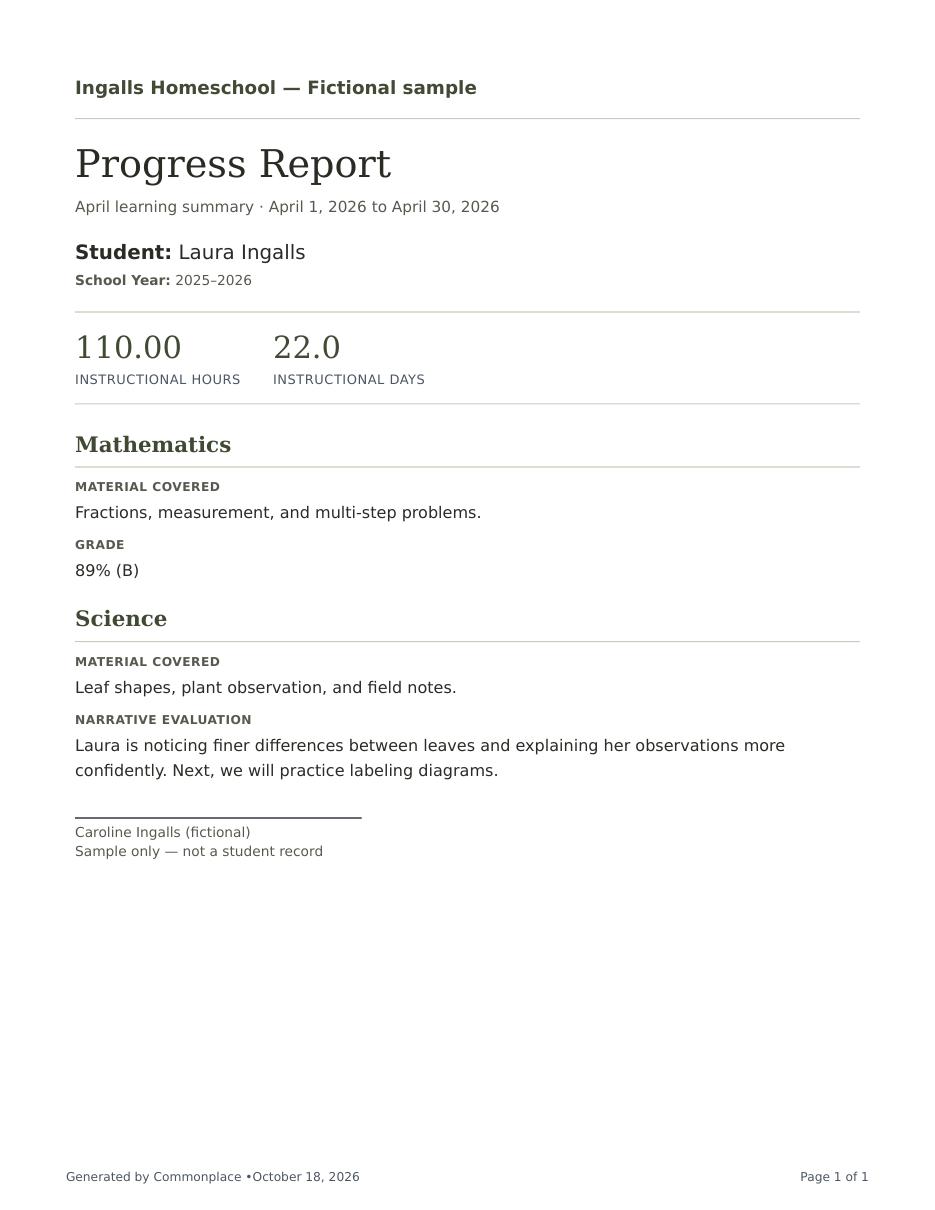
- From attendance: 22 days and 110 hours for April.
- Math evaluation: 89% (B), reviewed for this sample report.
- Parent-written narrative: Laura is describing differences between leaves more confidently.
Fictional Ingalls family data. Actual PDF generated by Commonplace.
Reporting without the blank page
Bring the school year’s details into one clear progress report.
Commonplace gives each student a reporting schedule and keeps the reporting period connected to the school year. Review recorded hours, instructional days when needed, curriculum coverage, evaluations, and your own notes before creating the finished document.
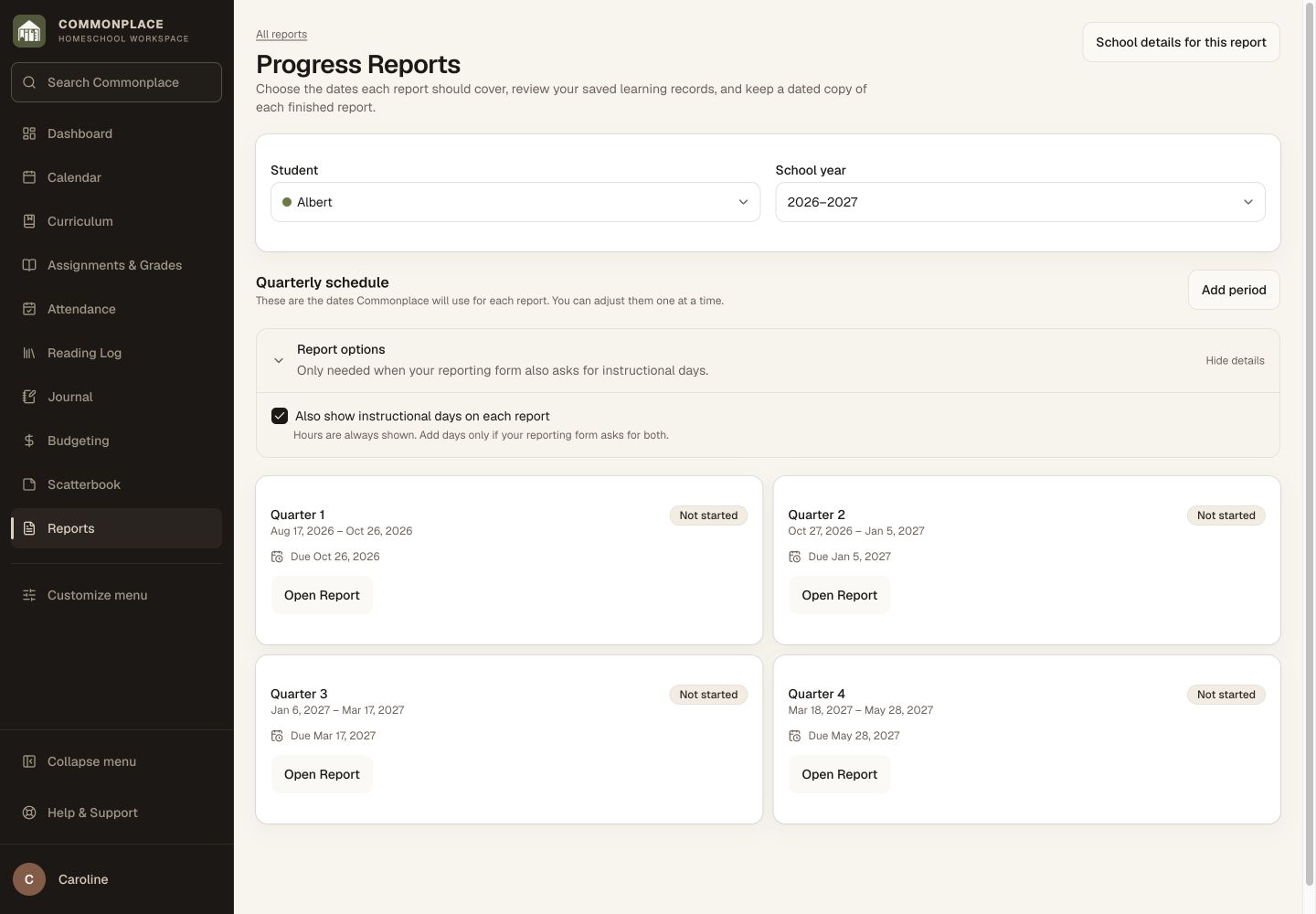
Fictional family data shown. Reports use the records and school details saved in your workspace.
Made for real reporting rhythms
Use the schedule your family or reporting organization actually follows.
Choose a cadence
Start with annual, quarterly, monthly, or custom reporting periods instead of forcing every family into one calendar.
Look over what you’ve saved
Bring together the hours, days, material covered, and evaluations already associated with that student and period.
Add your judgment
Include teacher notes and narrative context so the report reflects the child, not only a collection of totals.
Finalize carefully
Review the report before creating a lasting version that will not shift as everyday records continue to change.
Track submission
Keep the submitted version and its status with the student’s other long-term homeschool documents.
Reuse school details
Use the homeschool name and identity already saved in Commonplace for consistent report headers.
From everyday work to a finished report
Review, explain, and preserve the period.
The report stays connected to the work while still leaving room for the teacher’s evaluation.
Set the periods
Choose the dates and due dates that match your reporting responsibilities.
Complete the review
Check the calculated records and write any subject-level or overall evaluation needed.
Keep the final copy
Finalize the report and retain the exact dated version you prepared or submitted.
Common questions
Homeschool progress reports, in plain language.
Can I create quarterly progress reports?
Yes. Commonplace supports quarterly, monthly, annual, and custom reporting schedules.
Can a report include instructional days?
Yes. Days can be included when your reporting form asks for them, while families that only need hours can leave them out.
Does Commonplace write the evaluation for me?
No. It organizes the underlying records and provides space for your own evaluation, keeping the teacher’s judgment in your hands.
Can I keep the exact version I submitted?
Yes. Finalized and submitted versions remain saved as dated records rather than changing with later edits.
Is this legal advice or a state-specific form?
No. Commonplace is a general recordkeeping tool. You remain responsible for checking the requirements that apply to your homeschool.
How is this different from a transcript?
A progress report describes a particular period. A transcript is a cumulative academic record of courses, grades, credits, and GPA.
Bring the learning together when it’s time to share progress.
Spend your time reviewing the student’s progress—not rebuilding the school year from scattered notes.
Start your free 14-day trial14 days free. No credit card. No automatic charge.
Then $9.99/month or $79/year for your whole family. See family pricing.