Homeschool reading log
A reading log for the books that shape your homeschool.
Scan an ISBN with your phone to fill in the cover, title, author, and pages—or enter any book manually. Then track independent reading, family read-alouds, recommendations, and completed books in one thoughtful reading list.
14 days free. No credit card. No automatic charge.
Then $9.99/month or $79/year for your whole family. See family pricing.
This year’s reading
Books worth remembering
See the result
From the book in your hand to a list you can print.
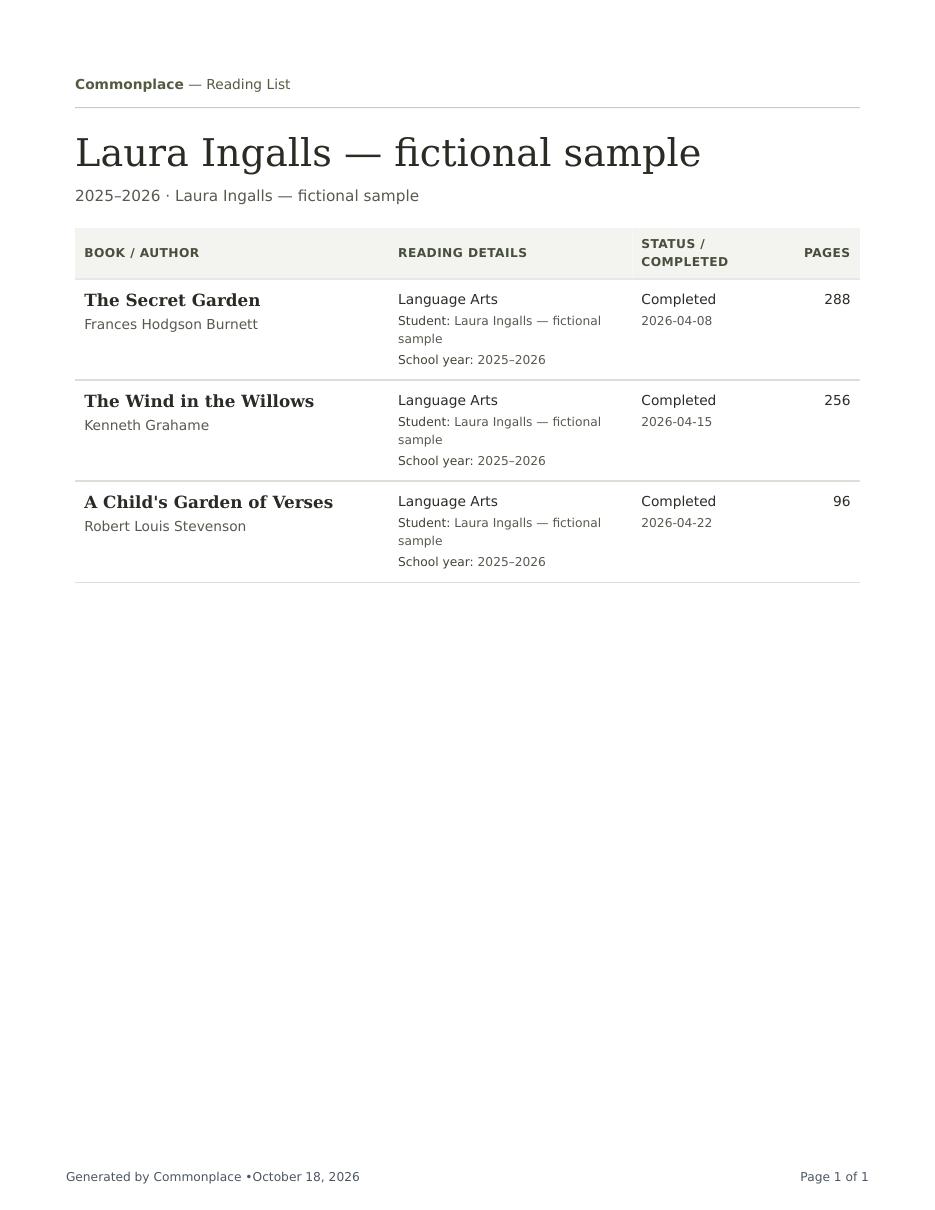
Scan an ISBN with your device’s camera to look up a book, or add it manually. Save who read it and when it was finished.
- Laura’s sample includes three completed books.
- Mark selected books for a portfolio.
- Have a spreadsheet already? Import your reading list and review it before saving.
Fictional Ingalls family data. Actual PDF generated by Commonplace.
Keep the work you’ve already done
Your spreadsheets can come with you.
Bring reading lists, attendance, or past courses from Excel or CSV. Match your columns, review the preview, and fix anything that needs attention before you save.
Start with one list. You can bring the rest over later.
See how spreadsheet imports work ↗Your family’s books, in one view
See what everyone is reading—and what they want to read next.
Search by title, author, or subject. Filter the list by student, reading status, or recommendations, then open a book whenever you want the full details.
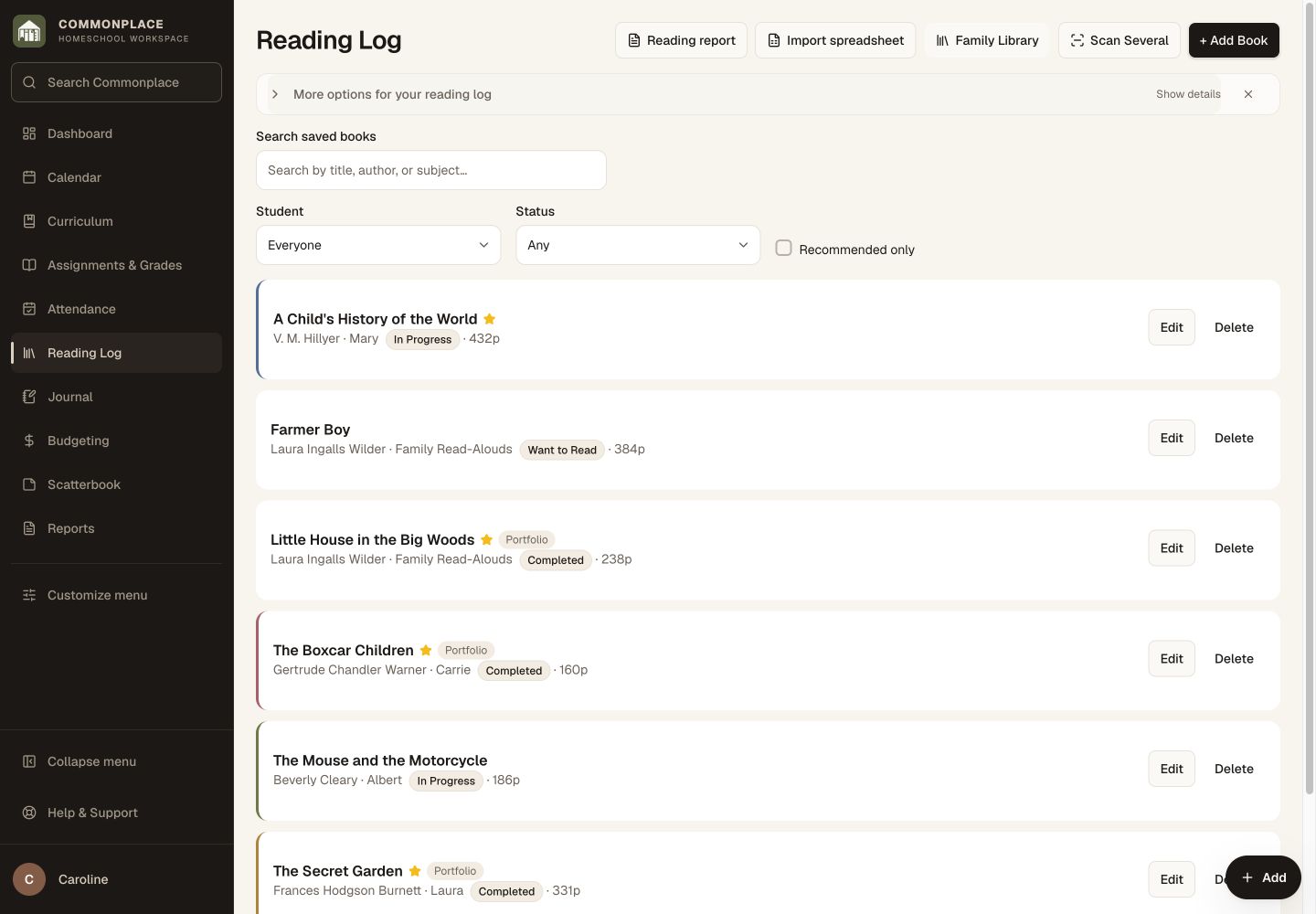
Fictional family data shown. Keep independent books and shared read-alouds in the same organized list.
From shelf to reading log
Scan a stack without typing every title.
Point your phone at the publisher’s ISBN barcode and Commonplace fills in the cover, title, author, and page count. Keep the camera open for several books, then apply the shared reader, status, source, or subject to the whole batch.
- Review and edit every detail before saving
- Get a gentle warning when a book may already be listed
- Skip the scanner and add any book manually whenever you prefer
More useful than a list of titles
Keep the reading details your family actually wants.
A good homeschool reading log can support planning, reflection, portfolios, and year-end records while staying simple enough to update.
Reader
Connect a book to one student or record it as a shared family read-aloud.
Status
Keep a natural reading queue with want to read, in progress, and completed states.
Book details
Scan an ISBN to fill the cover, title, author, and pages, then add subjects, dates, or other context when it matters.
Recommendations
Mark promising books so a suggestion does not disappear before the next library visit.
Portfolio context
Identify reading that belongs in a student portfolio or helps tell the story of the year.
Turn the filtered list into a clean reading record when you need a paper or PDF copy.
A simple reading rhythm
From “we should read that” to “remember when we read this?”
Keep future books and finished books in the same place, with just enough detail to make the list useful later.
Scan or enter the book
Use your phone camera to add one ISBN or scan several books continuously. No ISBN? Enter the title and details manually instead.
Update the journey
Move the book from want to read to in progress to completed as your family makes its way through it.
Use the list
Search, filter, print, or draw on the reading record when planning, reflecting, or assembling year-end materials.
Reading belongs in the bigger story
Keep the book list close to the rest of the learning.
A finished novel may also be literature coursework. A bird book may connect to science, a nature walk, and a portfolio entry. In Commonplace, the reading log lives beside the courses, activities, journal, and reports that give those books context.
Printable reading list
Family reading · 2026–2027
A reading list for your files, portfolio, or year-end review.
Common questions
Homeschool reading logs, in plain language.
Can I track books for more than one child?
Yes. Each book can be connected to the appropriate student, and you can filter the reading log to see one reader at a time.
Can I record family read-alouds?
Yes. Shared books can be recorded for the family instead of assigning the same read-aloud separately to every child.
Do I need an ISBN to add a book?
No. ISBN scanning is optional. You can always add a book manually and enter as much or as little detail as you need.
Can I scan several books at once?
Yes. Keep the phone camera open to build a queue, apply shared details to the batch, and review each book before saving.
Can I keep books we have not started yet?
Yes. Use the want-to-read status for future books and recommendations, then update the status when reading begins or is completed.
What book details can I record?
You can keep useful information such as cover, title, author, reader, subject, page count, status, dates, recommendations, and portfolio context.
Can I print the homeschool reading log?
Yes. The reading log includes a print option so you can keep a clean copy with your other homeschool records.
Does every book have to be connected to a course?
No. The reading log works for formal coursework, independent reading, family read-alouds, and books read simply because someone loved them.
A reading list that fits the portfolio.
Include in Portfolio is visible and checked by default when you add books, including Quick Add and adding several books. You can uncheck it for any book. In the portfolio, selected books appear as a compact numbered list of titles and authors. Book notes are optional: choose Include book notes in the portfolio settings to add them.
Keep the books. Remember the reading life around them.
Start with the next book, then let the list become part of your family’s longer homeschool story.
Start your free 14-day trial14 days free. No credit card. No automatic charge.
Then $9.99/month or $79/year for your whole family. See family pricing.