Homeschool curriculum planner
Give every resource a place in the year.
Organize the books, programs, courses, websites, and recurring resources each child uses—then connect them to subjects, schedules, grades, credits, and daily work when useful.
14 days free. No credit card. No automatic charge.
Then $9.99/month or $79/year for your whole family. See family pricing.
Laura · 2026–2027
Curriculum in use
See the result
Give each resource a child, a subject, and a place.
Keep your books and programs organized around who is using them. Connect a curriculum assignment to a course when you want the learning and grades together.
- See your resources by student and subject.
- Use scheduling where it helps your daily flow.
- Add course descriptions and resources to a printable course of study.
Fictional Ingalls family data. Actual PDF generated by Commonplace.
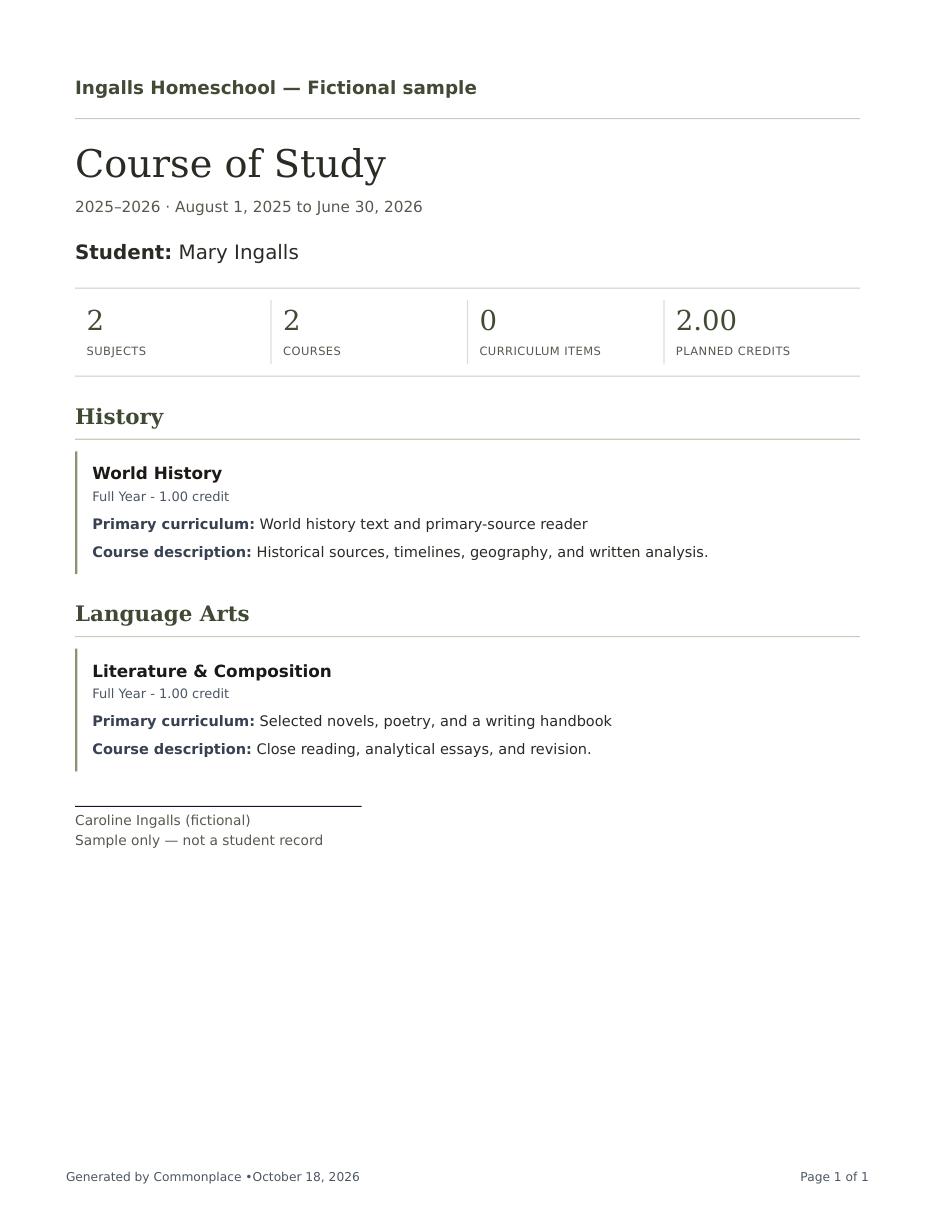
A home for everything you chose
See the curriculum across students without losing the subject-level detail.
Search resources by name, subject, or notes. Keep current materials easy to reach while finished and future resources remain available when you need the longer view.
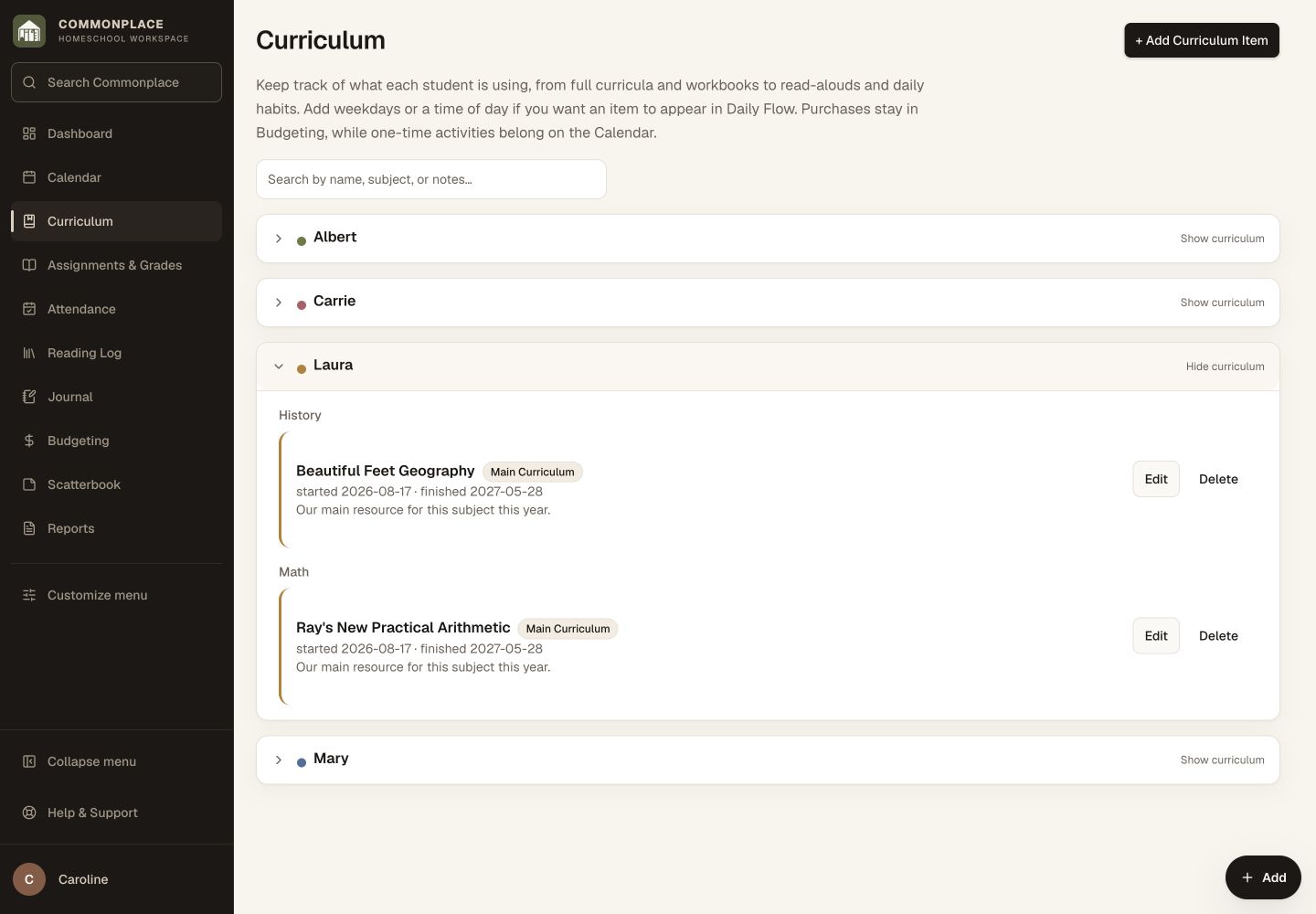
Fictional family data shown. Curriculum stays grouped by student, subject, and school year.
Enough detail to make the plan useful
Keep each resource beside the plans you have for it.
A curriculum item can be as simple as a book title or carry the scheduling and course details needed for a more formal high-school plan.
Student and subject
Connect each resource to the learner and one or more subjects it supports.
Role
Identify a resource as the primary spine, a supplement, or something used together.
Dates and notes
Add start and end dates plus practical notes without making every field mandatory.
Daily Flow
Choose weekdays and a time block when the resource should appear in the day’s flow.
Linked course
Create or connect a course for assignments, grading, completed work, and reports.
High-school detail
Keep course title, grade level, description, grading method, credit value, and completion status when needed.
From shelf to school day
Choose the resource, place it in the year, and connect the work.
The curriculum list becomes more useful when it can feed the daily plan and the lasting course record.
Add what you use
Enter a book, program, course of study, website, or recurring learning resource for the right student and subject.
Choose its rhythm
Add dates, weekdays, and a time block when you want the item to appear in Daily Flow.
Connect the course
Link curriculum to course work when you need assignments, grades, credits, descriptions, or transcript detail.
From the books you choose to the work your children do
Let the curriculum describe both the intention and the work.
The curriculum entry holds what you planned to use. Its linked course holds the assignments, results, work samples, and formal academic detail. That separation keeps the resource reusable without blurring it into the record of one school year.
Resource
The enduring book, program, website, or course of study your family selected.
Schedule
The optional dates, weekdays, and time block that place it into Daily Flow.
Course
The school-year-specific assignments, grade, credit, status, and transcript description.
Common questions
Homeschool curriculum planning, in plain language.
What counts as a curriculum item?
A curriculum item can be a book, program, course of study, website, subscription, or recurring learning resource used by a student.
Can one resource cover more than one subject?
Yes. When adding curriculum, you can connect a resource across relevant subjects rather than duplicating the planning work.
Can I distinguish primary and supplemental materials?
Yes. Curriculum roles include primary spine, supplemental, and together, helping you describe how each resource is used.
Do I have to schedule every resource?
No. Dates, weekdays, and time blocks are optional. Leave them blank when you want the resource organized but not placed in Daily Flow.
How does curriculum connect to grades and transcripts?
A curriculum item can create or link to a school-year course containing assignments, grading setup, credit, completion status, and transcript details.
Can I keep finished or future curriculum?
Yes. Finished and not-yet-started resources remain available in their own views instead of crowding the current curriculum list.
Turn a shelf of good resources into a plan your family can actually use.
Keep curriculum organized, place it gently into the week, and keep it beside the learning as the work begins.
Start your free 14-day trial14 days free. No credit card. No automatic charge.
Then $9.99/month or $79/year for your whole family. See family pricing.